Burning Discs
OrgZ writes audio CDs and data discs directly to the drive - no third-party burning app, no cue-sheet wrangling.
Starting a burn
Two ways in, both landing on the same Burn Disc dialog:
- Open a playlist (or Favorites) and click Burn Disc… in the header. The button appears only when an optical drive is present. The playlist's name becomes the disc title.
- Select tracks anywhere in your library, right-click, and choose Burn to CD….
Tracks with no local audio file - radio stations sitting in Favorites, for instance - are skipped.
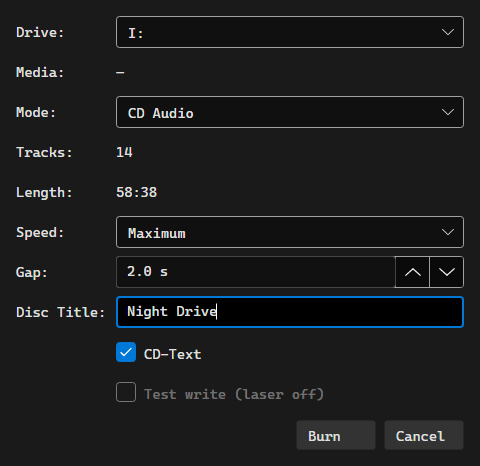
The Burn Disc dialog
| Field | What it does |
|---|---|
| Drive | The recorder to write with. OrgZ probes the selected drive live. |
| Media | What's actually in the tray: blank/not blank, type, capacity. |
| Mode | CD Audio, CD Data, or DVD Data. Modes the loaded disc can't take are disabled. |
| Tracks / Length | For audio, the running time against the disc's capacity; for data, bytes. Over capacity turns red, a Discs row shows how many discs the set would need, and Burn is disabled. |
| Speed | Write speed for audio burns (Maximum, 24x, 16x, 8x, 4x). |
| Gap | Silence between tracks, 0-5 s in half-second steps. 0 is a gapless disc. |
| Disc Title | CD-TEXT disc title on an audio burn, volume label on a data disc. |
| CD-Text | Writes disc and per-track artist/title into the lead-in. Audio only. |
| Test write (laser off) | Simulates the whole burn. Offered only on write-once media - MMC forbids simulation on high-speed rewritables. |
If the disc isn't blank but is erasable, OrgZ offers to quick-erase it first; otherwise a used disc is refused.
Audio CDs
A Red Book disc needs 16-bit / 44.1 kHz / stereo PCM, so every track is converted to a sector-aligned WAV first (that's the "Converting…" phase), then the whole disc is written Disc-At-Once from a full cue sheet. The disc carries at most 99 tracks, and each track is at least 4 seconds long.
CD-TEXT carries each track's title and artist; the disc performer line is written when every track shares one artist.
A started burn can't be cancelled
Cancelling during the conversion phase is clean. Once the laser is writing, the Cancel button stops offering - aborting mid-write is a guaranteed coaster. The drive ejects when it finishes.
Data discs
Data mode writes an ISO 9660 / Joliet / UDF disc laid out as
Artist/Album/file. CD-R and CD-RW are written TAO Mode 1; a DVD+RW is
overwritten in place.
By default your files are copied as they are. Settings → Burning → Data Disc can convert them on the way out instead - MP3, AAC, Apple Lossless, FLAC, or WAV at 128/192/256/320 kbps for the lossy formats - which is how you fit a FLAC library onto a disc a car stereo will read. Files already in the target format pass through untouched.
Settings
Settings → Burning holds the defaults the dialog opens with:
- Audio CD: gap between songs (none/gapless or 2 seconds) and whether to write CD-TEXT.
- Data Disc: the conversion format and the lossy bitrate above.
- Disc Image: where disc images live -
.disc-imagesinside your music library folder. Not configurable; it is shown so you know where to look.
Permissions
Writing to a drive needs raw SCSI access, which is privileged on Windows. If the
background service is installed (the MSI registers it), the burn runs through it
silently - and keeps running even if you close OrgZ. Otherwise Windows asks for
consent once per burn. On macOS and Linux the write runs in-process; on Linux
your user needs access to the drive, which usually means the cdrom group - see
Installation.
Troubleshooting
| Symptom | Likely cause |
|---|---|
| No Burn Disc… button | No optical drive was detected, or the view isn't a playlist / Favorites. |
| "ffmpeg wasn't found" | Audio burns transcode through ffmpeg. It ships with the release packages; a build run from source needs it on PATH. |
| Burn is greyed out | The mode isn't valid for the loaded disc, no blank disc is in the tray, or the set is over capacity. |
| Drive reports busy | A prior operation left it mid-flight. Eject and reinsert the disc. |
| Test write is greyed out | The disc is rewritable; simulation isn't allowed on it. |